
The administrator's account for QTS is “admin” by default. Having a generic and easily-guessable name for a system-critical account is not recommended for security purposes, as it leaves a potential hacker with just the correct password to guess before they have full control over your system. To safeguard you against this scenario, the system administrator "admin" account is disabled by default. To enable, please follow the below steps:
Please note: The "admin" account cannot be disabled if you want to access the Turbo NAS via SSH.
1. Create a new administrator account
- Log in to QTS with the "exx" account.
- Go to Control Panel > Users.
- Make sure "exx" user is assigned to the "administrators" user group.

2. Enable the "admin" account
- Log in to QTS as exx.
- Go to Control Panel > Users and edit the "admin" account profile.
- Tick the “Enable this account” option and select "OK".
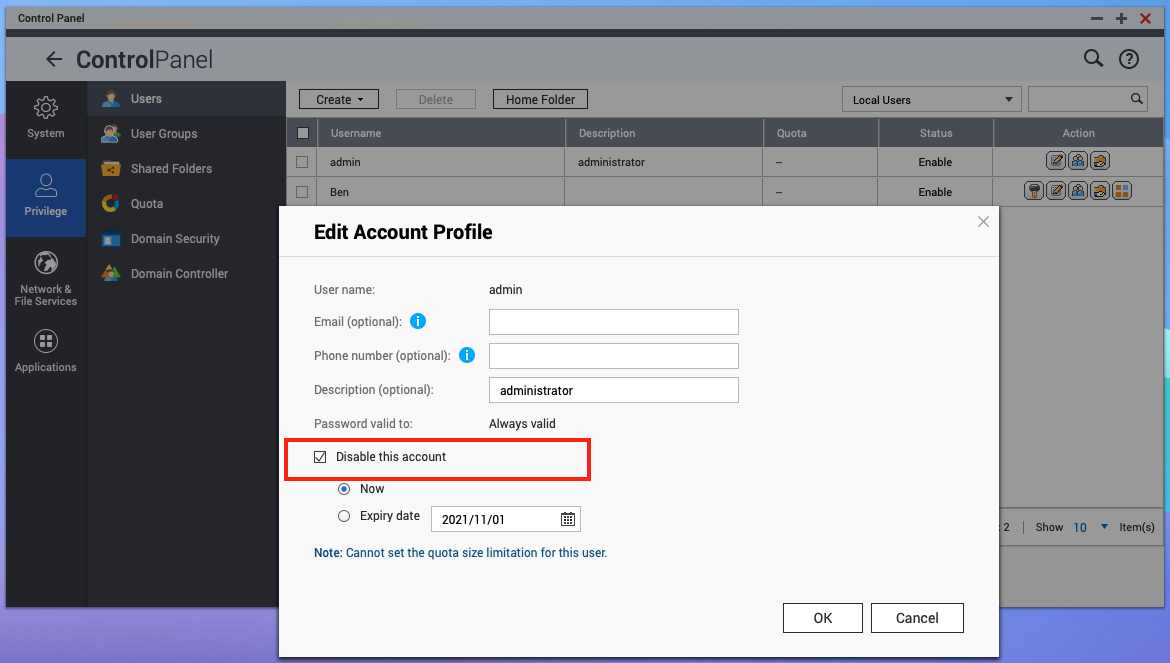
Please note: Only local NAS users can enable and disable user accounts.
Related to
Comments
0 comments
Please sign in to leave a comment.